


WordPress Client Portal Plugin for
Agencies and Service Businesses
Running an agency should not mean searching through Gmail, WhatsApp, Slack and shared drives every time you need a client file, project update or approval.
When client work is spread across separate tools, communication becomes difficult to follow. Files get buried, feedback is missed, approvals take longer and clients repeatedly ask for status updates.



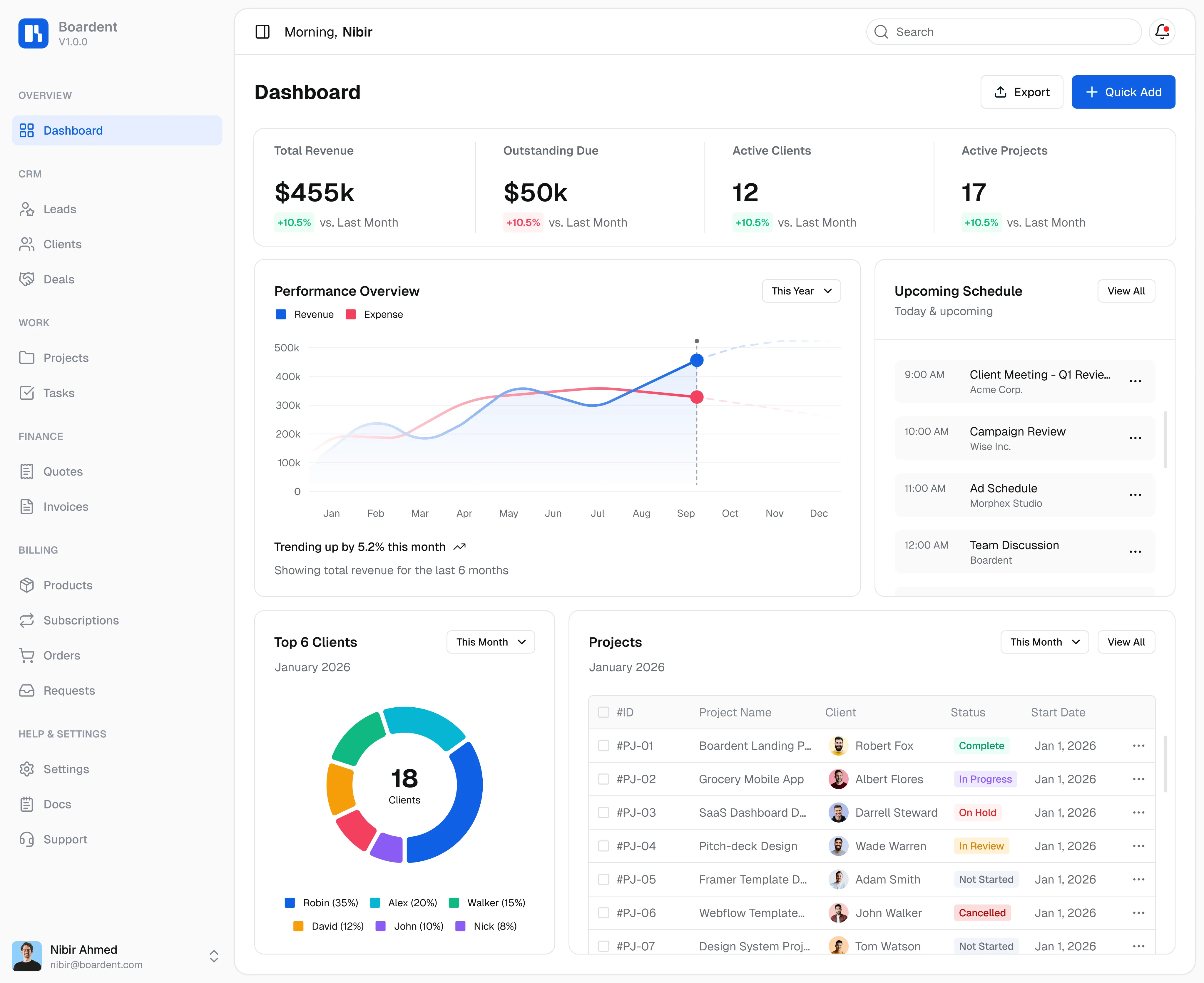
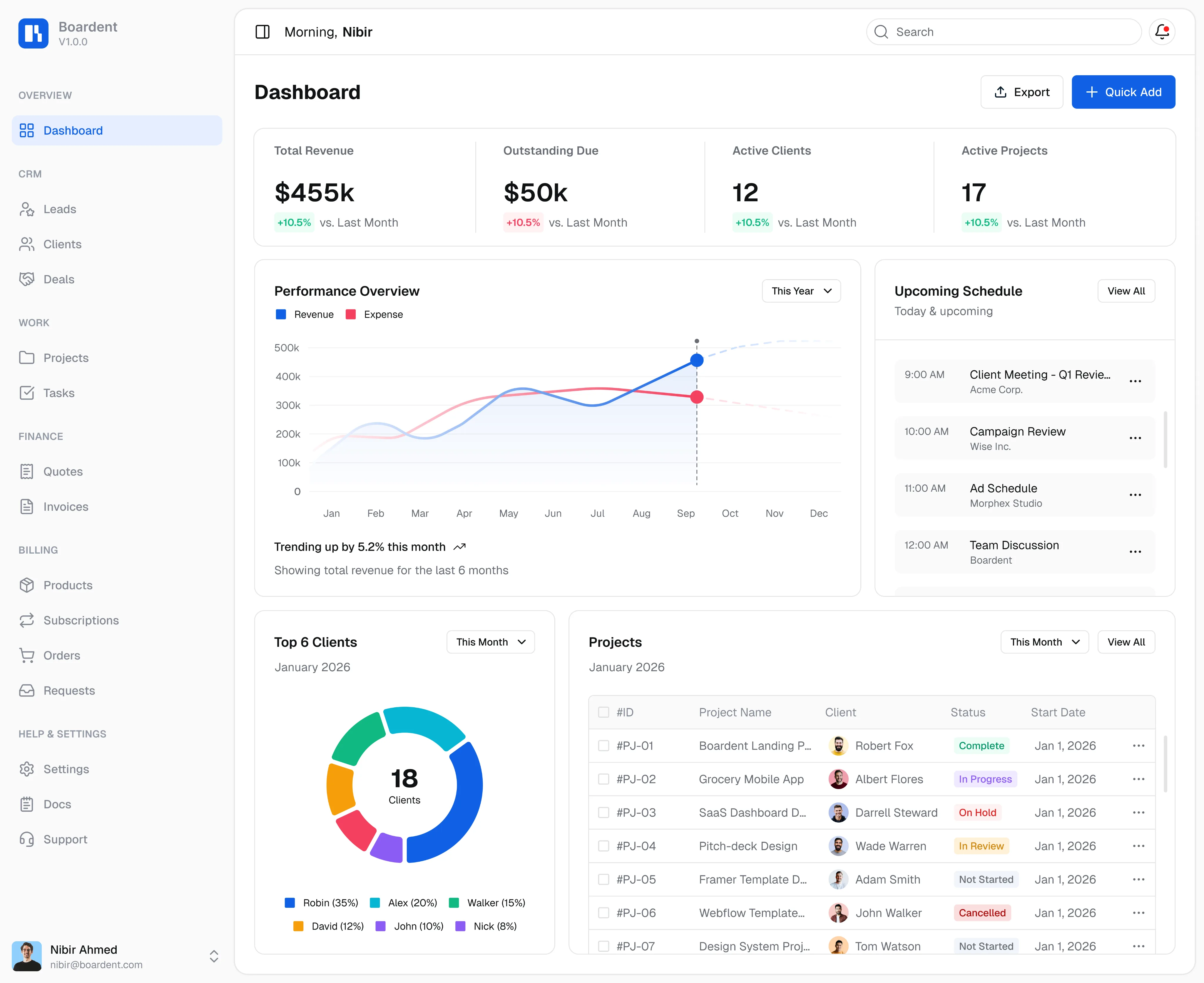
Boardent is a WordPress client portal plugin built for agencies and service businesses that want to manage client communication, project visibility, shared files and approvals from one connected system.
Instead of sending clients across several unrelated platforms, Boardent gives them a dedicated client-facing workspace connected to your CRM and project workflow. Clients can stay informed, while your team keeps control of internal tasks, responsibilities and business information.
With Boardent, client communication finally has one organised home.
What Is a WordPress Client Portal Plugin?
A WordPress client portal plugin creates a private client-facing area connected to your WordPress website.
Rather than receiving project updates through scattered emails and messages, clients can access a dedicated dashboard where they can review the information relevant to their work.
Boardent goes beyond providing a basic login page. It connects the client portal with CRM records, projects, tasks and business workflows. For your team, this means client information remains connected to the actual work. For your clients, it creates a clearer and more professional experience.
Depending on the features enabled, a client portal may allow clients to:
- Follow project progress
- Review recent updates
- Access shared files and documents
- Check meeting notes
- Review pending approvals
- View relevant client information
- Stay connected with the service team
Why Agencies Need a Client Portal
Managing one or two clients through email may be possible. Managing many active clients, projects and deliverables that way quickly becomes difficult.
Client Communication Becomes Scattered
One client sends feedback by email. Another sends a file through WhatsApp. A third adds comments in Slack. When communication exists across several platforms, nobody is completely sure where the latest information is stored.
This can lead to: missed client requests, duplicate work, conflicting instructions, delayed responses, and lost project context. A client portal gives every client relationship a more organised communication workflow.
Files Become Difficult to Find
Agencies regularly exchange design files, documents, reports, brand assets, project materials, drafts and deliverables. When those files are shared through long email chains or unrelated cloud folders, it becomes difficult to identify the latest version.
A WordPress file sharing client portal helps keep shared documents connected to the correct client and project.
Client Approvals Slow Down Projects
A deliverable may be ready, but the next stage cannot begin until the client reviews or approves it. When approval requests are buried in emails or chat threads, deadlines can easily slip.
A structured client portal makes it easier to keep review requests and decisions connected to the relevant project.
Business Tools Become Disconnected
Your CRM may contain the contact information. Your project-management platform may hold the tasks. Your inbox may contain the feedback. Your invoicing tool may hold the financial history. None of these systems automatically provides the full client context.
Boardent connects the client record with the project workflow and client-facing portal.
Give Every Client a Dedicated WordPress Dashboard
Boardent works as a WordPress client dashboard plugin, giving each client a focused view of the information relevant to their work.
Clients do not need access to your complete internal WordPress dashboard. Instead, they receive a client-facing experience designed around their projects, updates, files and required actions.
A clear dashboard can help clients answer common questions without repeatedly contacting your team:
- Has the project started?
- What stage is the work currently in?
- Where can I find the latest document?
- What does the team need from me?
- What is waiting for my review?
- What happens next?
This gives clients better visibility while helping your team reduce repetitive status-update emails.


Manage Client Communication in One Place
The main purpose of Boardent is not simply to give clients another login. It gives your business one connected place for client-related information.
Instead of searching through several inboxes and messaging platforms, your team can keep relevant updates connected to the correct client and project.
This helps reduce situations where:
- A client receives outdated information
- Feedback is sent to the wrong team member
- Important decisions remain buried in email
- Previous communication cannot be found
- The client and project team have different information
For agencies comparing a client portal plugin for WordPress, this connection is important. A standalone portal may display information, but Boardent connects client visibility with the wider CRM and project-management workflow.


Share Files and Documents Through the Client Portal
File sharing is one of the areas where agency workflows commonly become disorganised. Files are often exchanged through email attachments, messaging apps and different cloud-storage folders. As the project grows, it becomes difficult to identify which file is current and what feedback belongs to it.
Boardent helps keep shared files and documents connected to the client workflow. This can make it easier to understand:
- Which client owns the file
- Which project the file supports
- Why it was shared
- Whether it requires review
- What action should happen next
A WordPress file sharing client portal can be especially useful for:
- Marketing agencies sharing campaign materials
- Web agencies sharing designs and content
- Consultants sharing reports and recommendations
- Creative agencies sharing drafts and brand assets
- IT companies sharing project documentation


Keep Client Reviews and Approvals Connected to the Project
Approvals are essential to agency delivery. A team may finish a task on time, but work can still stop because the client has not reviewed the deliverable. The approval request may be buried in an email or disconnected from the project information the client needs.
Boardent helps agencies organise reviews and approvals within the wider client workflow. This can help your team:
- Show clients what requires attention
- Keep decisions connected to the project
- Reduce repeated follow-up messages
- Identify outstanding client actions
- Maintain a clearer delivery history
- Move approved work into the next stage
The result is a more structured approval process and fewer project delays caused by scattered communication.
Connect CRM, Projects and the Client Portal
Boardent is more than a standalone portal. It combines CRM, project management and client-facing visibility, creating a WordPress CRM plugin with client portal functionality.
CRM and Client Records
The CRM stores:
A potential customer can move from lead to active client without forcing your team to recreate their details in another system.
Project Management
Once the client is onboarded, their work can be organised into projects containing:
The project remains connected to the client record.
Client Portal
The portal becomes the client-facing layer of the workflow. It gives clients visibility into the information they need without exposing sensitive internal operations. Because Boardent provides a client portal with project management, the client experience remains connected to the work your team is delivering.


How the Boardent Client Portal Workflow Works
A typical agency workflow with Boardent creates one connected journey:
1. Add or Qualify a Lead
A potential customer enters the CRM. The team stores contact details, tracks communication and records the opportunity.
2. Convert the Lead Into a Client
When the opportunity is won, the lead becomes an active client with an organised relationship history.
3. Create the Client Project
The team creates a project connected to the client and adds the relevant tasks, milestones and deadlines.
4. Provide Client Portal Access
The client receives access to the appropriate client-facing workspace without seeing sensitive internal information.
5. Share Project Information and Files
Relevant updates, documents and project information become available through the connected client experience.
6. Record Meetings and Decisions
Meeting details, important updates and agreed actions stay connected to the client engagement.
7. Manage Reviews and Approvals
The team can keep approval requirements connected to the relevant deliverable and project stage.
More Than a Basic Client Portal Plugin
Many client portal tools focus only on document access or customer logins. Boardent is designed as a broader WordPress plugin to manage clients and projects.
The platform connects:
- CRM
- Client records
- Projects
- Tasks
- Scheduling
- Invoices
- Team collaboration
- Client-facing visibility
This matters because the client experience does not begin when someone logs into a portal. It begins when they first contact your business and continues through onboarding, project delivery, billing and long-term relationship management.
Boardent helps connect that complete client lifecycle instead of treating every stage as a separate process.

Boardent Client Portal vs a Disconnected Client Workflow
Disconnected workflow
- Updates spread across email and messaging apps
- Files stored in unrelated locations
- CRM separated from project delivery
- Clients repeatedly request updates
- Approvals buried in messages
- Internal and client information mixed together
- Multiple platforms and dashboards
Boardent client portal
- Client information connected to one workflow
- Shared files connected to client work
- CRM and projects remain connected
- Clients receive clearer project visibility
- Reviews remain connected to the project
- Separate team and client experiences
- One connected business system
Benefits of Using a WordPress Client Portal Plugin
Using Boardent as a WordPress client portal can help agencies and service businesses:
For teams managing many clients at once, these benefits can help projects move forward instead of becoming delayed in someone’s inbox.
Built for Agencies and Service Businesses
Digital Marketing Agencies
Marketing agencies can organise client relationships, campaign projects, shared materials and delivery updates within one connected workflow.
SEO Agencies
SEO agencies can manage recurring client work, deliverables, communication and project visibility without relying entirely on email threads.
Web Design and Development Agencies
Web agencies can connect client onboarding, website projects, milestones, documents, reviews and approvals.
Creative and Branding Agencies
Creative teams can organise project stages, shared assets, client updates and feedback requirements.
Consultants
Consultants can provide clients with a structured way to review engagement progress, documents and meeting information.
IT and Professional Service Companies
IT and service businesses can maintain client history, project information and ongoing service communication in one connected system.
Client Access and Role-Based Permissions
A useful client portal must show the right information to the right people. Boardent can use separate access levels for administrators, team members and clients.
This helps businesses:
- Give clients access to relevant information
- Prevent clients from viewing other accounts
- Keep internal work separate from client-facing updates
- Assign team access according to responsibility
- Maintain clearer control over business information

Get Answers to
Common Questions
What is a WordPress client portal plugin?
A WordPress client portal plugin creates a private client-facing area connected to your WordPress website. Rather than receiving project updates through scattered emails and messages, clients can access a dedicated dashboard where they can review the information relevant to their work.
Can clients view project progress in Boardent?
Boardent is designed to give clients visibility into relevant project progress and updates while keeping internal team information separate.
Can clients access shared files?
Boardent can provide clients with access to shared files and documents connected to their work.
Does Boardent connect with CRM and projects?
Yes. Boardent connects CRM records, client information and project workflows. This allows a lead to become a client and move into project delivery without relying on several disconnected systems.
Is Boardent only a client portal plugin?
No. Boardent is also a WordPress business management plugin that connects CRM, projects, invoicing, scheduling, collaboration and client-facing workflows.
Is Boardent the best WordPress client portal plugin for agencies?
The best WordPress client portal plugin for agencies depends on the agency’s required features, integrations, hosting preferences and workflow. Boardent is particularly suitable for agencies that want to connect client visibility with CRM and project delivery.
Who should use Boardent?
Boardent is designed for digital agencies, marketing agencies, SEO agencies, web design companies, consultants, IT businesses, and professional service providers. It is especially useful for businesses managing multiple clients and structured project work.
Can Boardent replace separate CRM and project-management tools?
Boardent combines CRM, projects and client-facing workflows in one system. Whether it can fully replace other tools depends on the business’s specific integrations, automation and operational requirements.
Can WordPress be used to manage clients and projects?
Yes. A WordPress client management plugin such as Boardent can extend WordPress beyond website publishing by adding CRM, project, client portal and operational features.


Bring Your Client Communication Into One Place
Stop searching through disconnected emails, messages and folders for the information your clients need. Boardent connects client progress, shared files, updates, meetings and approvals with your CRM and project-management workflow. Give your internal team more structure and provide clients with a clearer, more professional experience.